
I’ve reviewed a lot of data warehouses. The pattern is almost always the same — either there’s no naming standard, or there are five different ones layered on top of each other depending on which developer was around when each table got added.
Mixed casing. Cryptic abbreviations. Some tables prefixed tbl_, others dw_, others nothing at all. Foreign keys named three different ways across three sibling tables.
It may sound like minor mess, but it’s actually a debt that will be paid in perpetuity.
Every developer who joins the project pays it. Every report that gets built pays it. Every audit, every migration, every “where did this column come from?” question pays it. And it’s all preventable.
The short version
- Decide casing once — PascalCase, camelCase, or snake_case — and never mix them within a layer.
- Decide on standard nomenclature (prefix, naming, suffixes, etc) — and apply them everywhere, not just where it’s convenient.
- Naming isn’t just cosmetic — it encodes your medallion-layer contract (raw vs. cleaned vs. business-ready) so anyone can tell what a table is allowed to do just by reading its name.
- There’s more than one legitimate way to name a table (Kimball-style, domain-driven, source-prefixed, catalog-driven) — the trade-off is discoverability vs. governance overhead, not “right vs. wrong.”
- The standard only survives if it’s written down and applied at the layer where names become final — not re-litigated table by table.
Why this is a governance problem, not a style problem
Most teams treat naming as a preference — something to bikeshed in a Slack thread and then ignore. That’s the wrong frame. A naming standard is the cheapest form of documentation you’ll ever write, because it’s documentation that’s impossible to skip. Every table, every column, every pipeline already has a name. The only choice is whether that name is informative or accidental. It’s something small that can be done upfront that pays big dividends.
Here’s the test I use: can a new hire, six months in, with minimal training, look at a table name and know what layer it lives in, what it’s for, and what’s safe to do with it — without opening a data dictionary? If not, the naming standard isn’t doing its job.
Pick your layer contract first
Before you touch casing or suffixes, decide what your medallion layers actually promise. We run most Fabric engagements on the same three-layer contract:
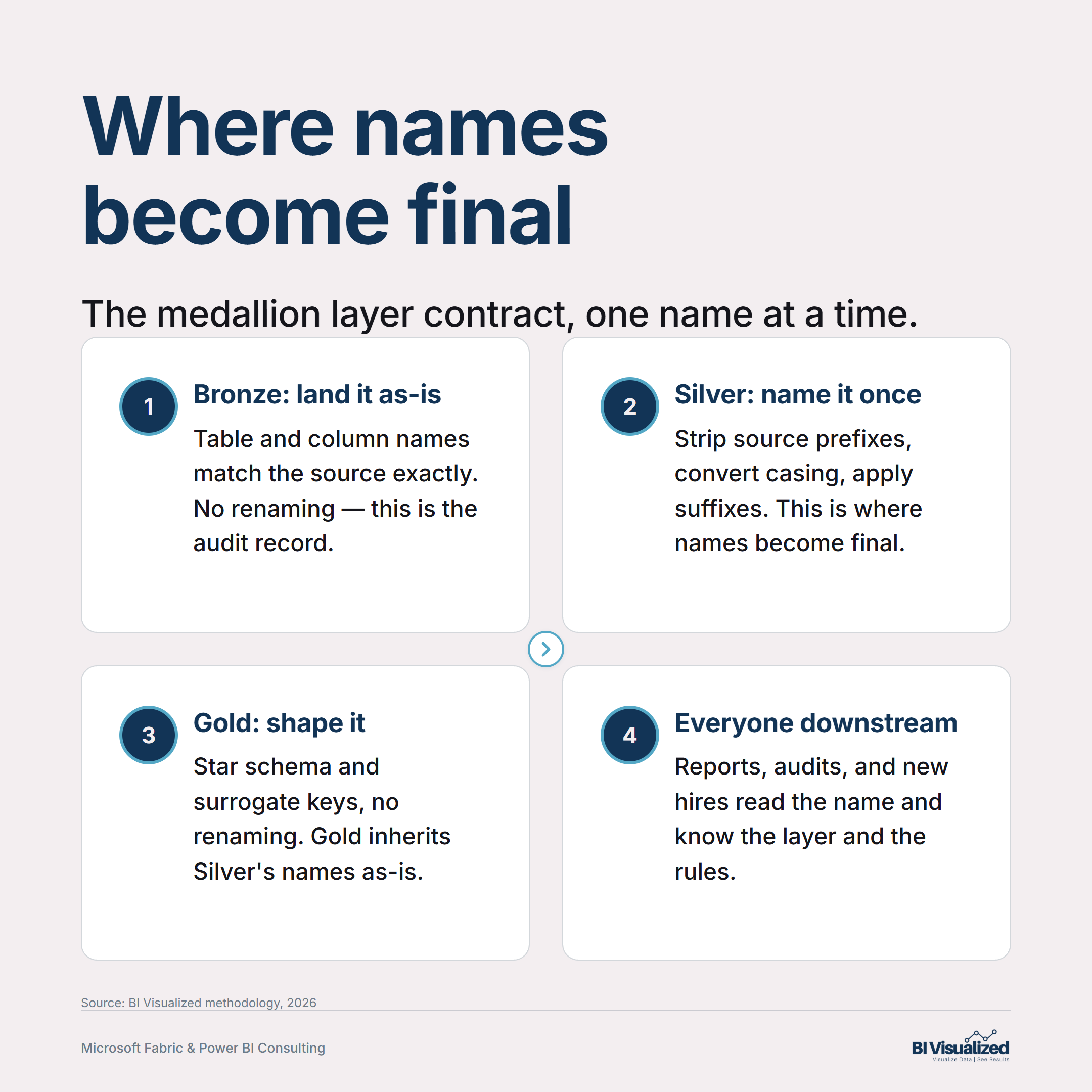
- Bronze — the faithful landing zone. Table and column names match the source exactly. No renaming, no casing changes. This is the audit record; if you rename here, you’ve broken the one place that proves what the source actually delivered.
- Silver — where names become final. This is the one layer where renaming should happen — source prefixes stripped, acronyms treated as words (
IdnotID,UrlnotURL), everything converted to a consistent case. Once a field is named in Silver, Gold and the semantic model inherit that name without further changes. - Gold — business-ready, no renaming. Gold shapes the star schema and adds surrogate keys, but it does not rename what Silver already named. If Gold is renaming things, that’s a sign Silver skipped a step.
Getting this sequencing right solves half the naming debate before you’ve picked a single prefix — because most naming fights are actually layer-boundary fights in disguise (“why did this get renamed here?”).
Four ways to name a table
There’s no single industry-standard table naming convention — and pretending there is just sets you up to fight the wrong battle. Here are the four real patterns for naming a table, what each buys you, and what it costs. (Note: “source” here always means the source-of-record system that generated the data — an ERP, an EHR, a CRM, an internal app — never the database platform underneath it. A table’s source is NetSuite or Salesforce; it is not “Fabric” or “Snowflake,” which is just where the table happens to live.)
Dim/Fact suffixes and Key surrogate-key columns trace back to Ralph Kimball’s The Data Warehouse Toolkit (1996), and the convention hasn’t meaningfully changed since — dbt’s modern "marts" layer uses the identical pattern under a new label. FactSales, DimCustomer reads instantly to any BI person, on any platform, with zero tooling required.
FactSales doesn’t tell you whether the data came from Salesforce or a homegrown order system. Fine for the reporting layer; thin everywhere else.The table name carries the business domain instead of the object type — Orders.Orders, Billing.HoursBilled — with ownership and governance distributed to the teams that know that domain best.
The table name encodes three things — which source system the data came from, what business entity it represents, and what class of table it is (fact, dimension, staging, lookup) — plus the schema it lives in signals which layer produced it.
Let a data catalog or documented lineage carry the source/class signal instead of encoding it in the table name — Billing.hours_billed, clean and readable on its own.
Orders, OrdersStaging, OrdersFinal degenerates fast, and the table name alone tells you nothing about where the data came from.None of these is objectively correct. The honest comparison is discoverability vs. governance overhead — a source-prefix scheme costs almost nothing to adopt and pays off immediately once you have two or more source systems landing side by side; a domain-driven scheme costs real organizational effort but scales better as the platform grows past what one team can hold in their head.
A concrete example: one table, four ways
Take a fact table recording billed hours from NetSuite, joined with an internal calculated margin.
We default to the third pattern specifically because it survives being read outside a catalog — in a PR diff, a DAX expression, an error log — with zero ambiguity about which source system produced the row.
Columns need the same discipline as tables
Table naming gets the design-review attention; column naming is where inconsistency actually lives day to day. Whichever table-naming approach you pick, apply a fixed suffix list to every column in Silver and Gold, with no exceptions — Bronze still preserves source column names as-is, per the layer contract above:
Idfor keys — neverID. Treat every acronym as a word (Url,Api,Npi) — notURL,API,NPI. It looks pedantic until you’re writing a regex against a table with both.Datevs.DateTimevs.UtcDateTime— pick based on what’s actually stored, not habit. AHireDatethat’s secretly a timestamp will eventually produce a timezone bug nobody can explain from the name alone.Amount,Pct,Hours,Count,Rate— units belong in the name.Utilizationtells you nothing;UtilizationPcttells you the scale before you’ve run a single query.
None of this is exciting. That’s the point — a good naming standard is boring by design, because boring is what makes it enforceable without a governance meeting every sprint.
The pattern
Decide your layer contract first — where names get finalized and where they don’t. Pick one of the four table-naming approaches deliberately, based on how many source systems you’re actually integrating and your real governance capacity, not on what looked good in someone else’s blog post. Then hold the column-suffix list fixed regardless of which table-naming approach you chose. The standard doesn’t need to be clever. It needs to be written down, applied at the layer where it matters, and never re-litigated table by table.
Your turn
If you audited your own warehouse today, how many different naming conventions would you find layered on top of each other — and could a new hire tell your Bronze tables from your Gold ones just by reading the names?
If you want a second set of eyes on your data platform’s structure — naming included — book a discovery call and we’ll walk through it.
— Jake Prevost, BI Visualized | Microsoft Fabric & Power BI Consulting

