
Fabric & Power BI Capacity Economics — Part 2 of 2
Part 1 covered when Fabric capacity gets cheaper than Power BI Pro licensing. This post covers a decision that comes right after: once you’re on Fabric, do you pay Pay-As-You-Go (PAYGo) by the hour, or commit to a year of Reserved pricing? The honest answer is “it depends on your architecture” — and I’ve watched that architecture question get skipped in favor of just moving forward and picking without really understanding the differences and how each could benefit your situation.
The short version
- Fabric bills two ways: PAYGo (only for the hours it runs) or Reserved (a flat monthly rate, one-year commitment, ~40% cheaper per hour if you ran it 24/7).
- The rule of thumb: if the capacity needs to be active more than ~60% of the day (about 14–15 hours), Reserved is cheaper. Below that, PAYGo wins.
- Don’t confuse the ~60% breakeven with the ~40% discount rate — they’re two different numbers that happen to be complements of each other.
- Reserved is billed whether the capacity is running or not. Running is different than using reports or running pipelines. Its really whether the capacity is not paused in Azure (Paused = not running).
- PAYGo is only billed for the hours of the day when the capacity is running (Not paused). Whether pausing is even realistic — and for how long — comes down entirely to where your interactive reporting sits relative to your background data processing.
PAYGo vs. Reserved, by the numbers
An F64 running 24/7 on PAYGo costs ~$8,410/month ($11.52/hr). The same F64 Reserved runs ~$5,000/month flat — about a 40% discount off the full 24/7 PAYGo rate (Microsoft’s own pricing page currently cites ~41%). But that discount percentage is not the breakeven point. Reserved is a flat fee regardless of hours used, so the real question is: what fraction of the day does the capacity actually need to be on? Cross that ~60% utilization line and Reserved wins; stay under it and PAYGo wins, discount or no discount.
Pausing only saves money on PAYGo. Reserved is a one-year commitment billed whether the capacity runs or not — pausing a Reserved capacity saves nothing.
Two architectures, two very different answers
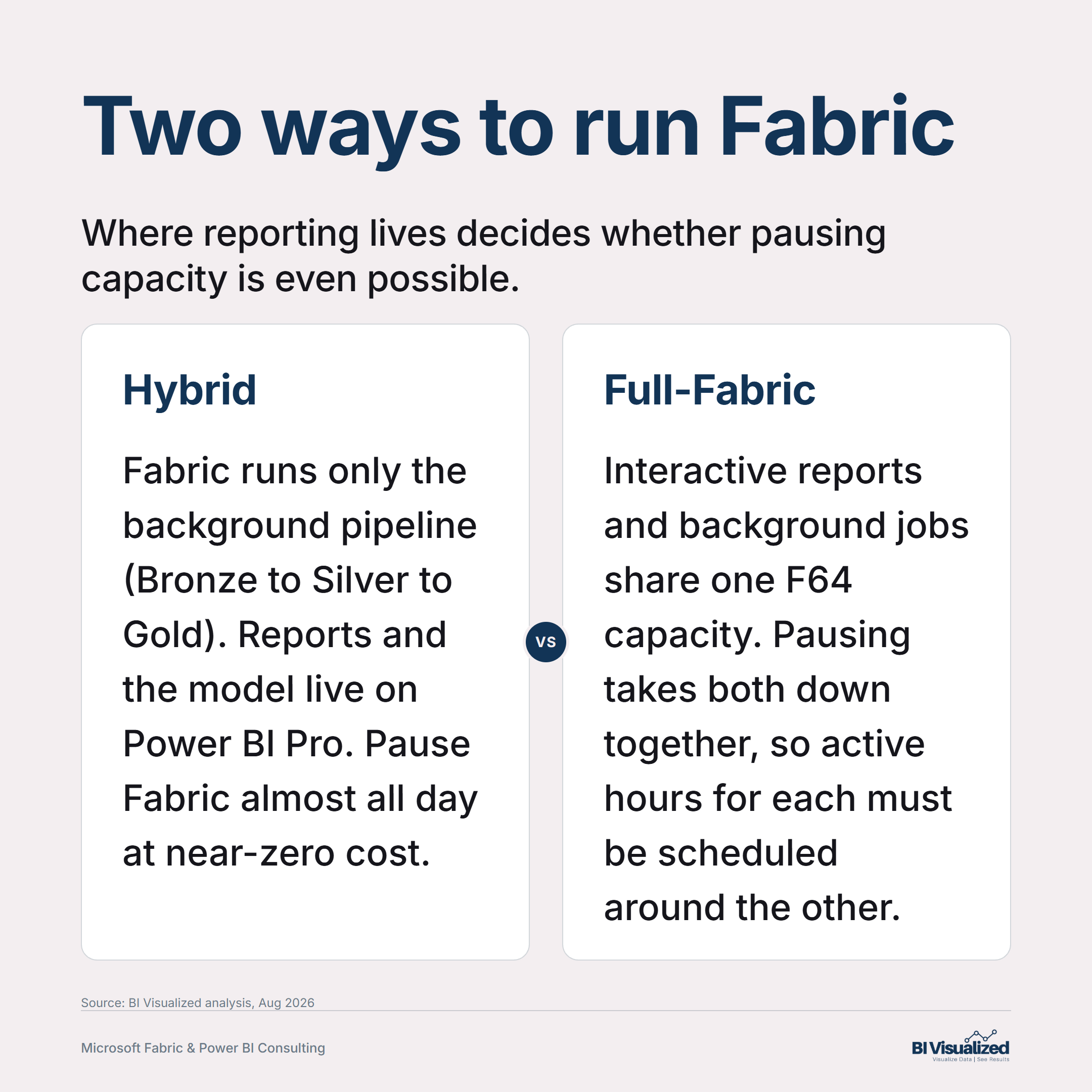
Whether pausing is realistic — and for how many hours — depends on whether your interactive reporting and your background data processing share a capacity or not. Pausing takes down the entire capacity at once; there’s no way to pause only background jobs while keeping interactive access alive on the same one.
Fabric handles only the background pipeline (Bronze → Silver → Gold); the semantic model (Import mode) and every report live on Power BI Pro with no live connection to the Fabric capacity at query time. Fabric’s job ends the moment Gold is ready, so it only needs to be active for as long as the pipeline takes each day — typically a much smaller SKU (F2/F4/F8/F16), not F64.
In a worked example with a 2-hour nightly pipeline, that’s roughly 8% utilization on any of these SKUs — nowhere close to the ~60% breakeven — so PAYGo wins by a wide margin.
Two things live in two different places:
| Lives on Fabric | Lives on Power BI Pro |
|---|---|
| Background only — the data pipeline (Bronze → Silver → Gold) | Interactive — the semantic model (Import mode) and every report, with no live connection to the Fabric capacity at query time |
| SKU | PAYGo rate | PAYGo cost (2 hrs/day) | Reserved cost (flat) | PAYGo saves |
|---|---|---|---|---|
| F2 | $0.36/hr | $22/mo | $156/mo | $134/mo |
| F4 | $0.72/hr | $43/mo | $313/mo | $270/mo |
| F8 | $1.44/hr | $86/mo | $625/mo | $539/mo |
| F16 | $2.88/hr | $173/mo | $1,251/mo | $1,078/mo |
| F32 | $5.76/hr | $346/mo | $2,501/mo | $2,155/mo |
Data engineering, the semantic model, and interactive reports (e.g., Direct Lake) all sit on one capacity, typically F64 sized to carry real interactive load. Pausing takes Interactive and Background down together, which forces a real scheduling question — interactive hours need it active for reporting, background jobs need active hours too, often overnight, and the two windows usually don’t overlap.
In a worked example (2am–4am background + 8am–6pm interactive = 12 hours/day, 50% utilization), PAYGo still wins, but the margin is much tighter than the hybrid case — $856/month, not the wide gap above.
| Metric | Value |
|---|---|
| Background (2am–4am) | 2 hrs |
| Interactive (8am–6pm) | 10 hrs |
| Total active hours / day | 12 hrs |
| Daily utilization | 50% |
| PAYGo rate | $11.52/hr |
| PAYGo cost (12 hrs × 30 days) | $4,147/mo |
| Reserved rate | $6.94/hr equiv. |
| Reserved cost (flat) | $5,003/mo |
| PAYGo still saves | $856/mo |
The cost of pausing isn’t only dollars
This is the part of the math that’s easy to skip. Every paused hour on a Full-Fabric setup is a bet that nobody needs a report during that window. That bet occasionally loses — an executive pulling numbers at 11pm, a manager checking a dashboard before a 6am shift start — and when it does, the report is simply unavailable, not slow or stale. That’s a support call and an unhappy stakeholder, not a line item, and it tends to erode trust in the platform faster than the dollar savings justify. If the utilization math is close to the ~60% line, or off-hours access is even occasionally needed, default to Reserved — the certainty is usually worth more than the marginal savings.
The pattern
Map your actual interactive and background hours onto a 24-hour clock before choosing PAYGo or Reserved — the ~60% rule of thumb only holds once you know what’s really sharing the capacity. Then ask the architecture question from Part 1 in the same breath: is a hybrid split (small Fabric SKU + Pro for reporting) worth trading away the free-viewer benefit for a near-zero-cost pause window, or does your reporting genuinely need to live on the Fabric capacity itself? The two posts are really one decision, looked at from two angles.
If you’re not sure which side of either line your organization sits on, book a discovery call and we’ll model your actual hours and headcount, not the rule of thumb.
About the author
— Jake Prevost, BI Visualized | Microsoft Fabric & Power BI Consulting
Pricing verified: August 2026. Microsoft pricing changes periodically — confirm current rates before a purchasing decision.
References
- Microsoft Fabric pricing — Azure (PAYGo and reserved capacity rates)
- Fabric capacity reservations — Microsoft Learn (reserved discount mechanics)
- Interactive and background operations in Fabric — Microsoft Learn
- Pause and resume your Fabric capacity — Microsoft Learn

